Bottom Line Studio AI
How to change a funnel stage without breaking every metric you have
Adding one stage to the front of a sales funnel touches ingestion, models, alerting, the CRM and every historical comparison. Here’s the order that works.
The CRM change takes twenty minutes. Everything that quietly depends on the old definition takes two weeks.
Sound familiar? Sales leadership wants a new stage at the front of the funnel, and it gets filed as a CRM ticket. Six months later, someone quotes a year-over-year conversion rate that compares two different definitions — and it looks entirely plausible.
Map the change surface first
I did exactly this on a client engagement this summer: a new stage in front of what used to be the first qualified one — an S0 for deals that exist but haven’t earned Stage 1. The most valuable hour of the project was spent making a list of everywhere the stage definition is encoded — not where it’s displayed, where it’s encoded. Those are the places that will keep meaning the old thing without telling you.
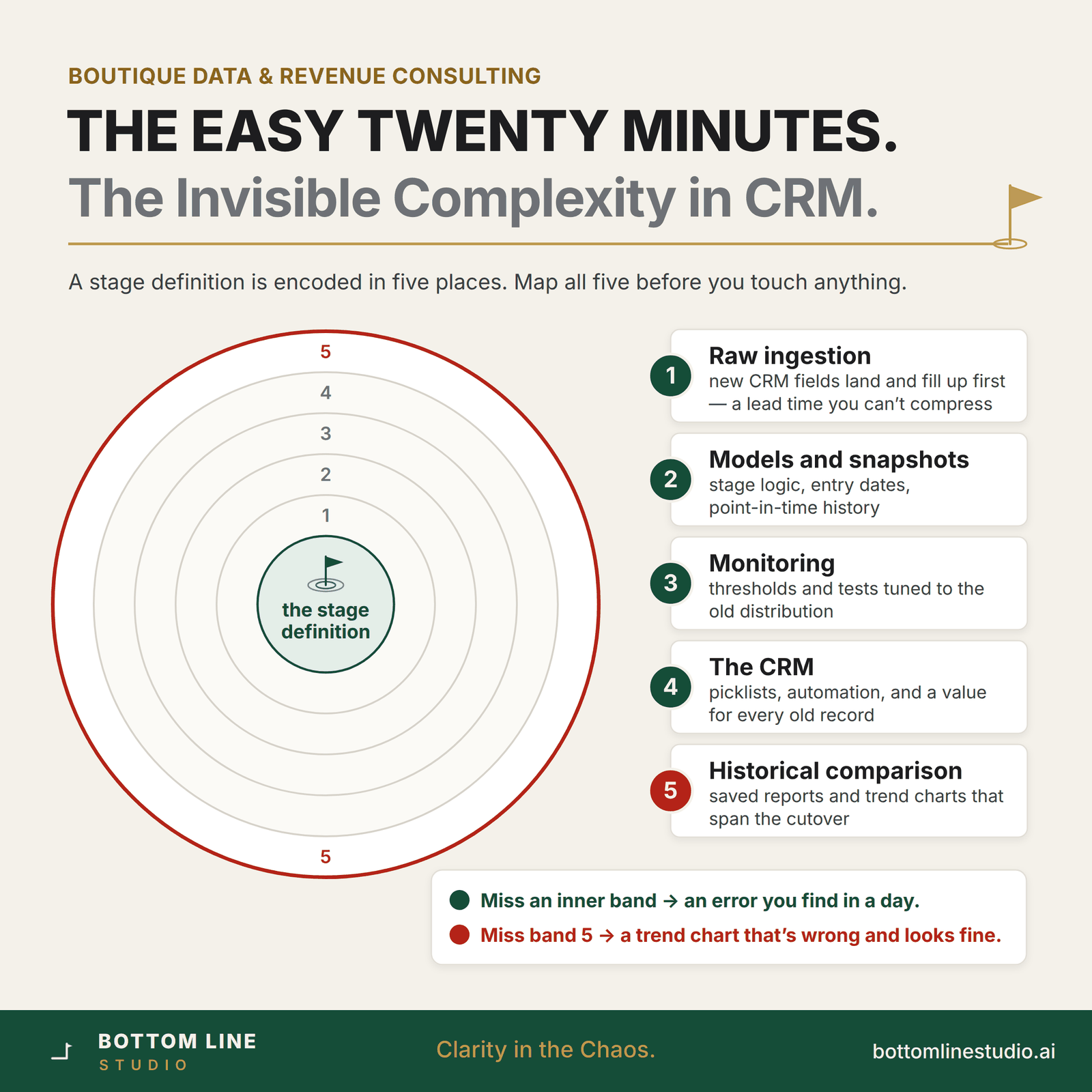
The order that works
Sequence matters more than speed, because some of these steps have a lead time you can’t compress:
- Land the new fields in ingestion, and let them fill up. You can’t validate logic against an empty column. This is why it’s two weeks, not two days.
- Build the new logic alongside the old. Compute both definitions for the same period. That side-by-side is the only evidence anyone will accept.
- Decide the backfill on purpose, and write it down. Reconstruct from history, assign a default, or leave it blank — and build the undo script now, before you need it.
- Hunt the edge cases. Query for the impossible: stage two with no stage-one date, entry dates after exit dates, stages that went backward.
- Move alerts and tests in the same change as the logic. Not after. An alert tuned to the old distribution will either flood or go silent, and both cost you trust in the alerting.
- Cut over the CRM, then reconcile. The next day: does the warehouse agree with the CRM, record for record?
- Mark the cutover on every chart that spans it, and update or retire any saved report that hardcodes the old stage names.
The snapshot trap
If you snapshot opportunity stage daily, your history now holds rows captured under two definitions with the same label. A conversion trend across that window compares incompatible things while looking perfectly continuous. You have three honest options: tag each snapshot row with the definition that produced it, restate history where the data supports it, or draw a hard line and refuse comparisons across it. Picking none of them — the default if nobody raises it — means publishing a broken comparison for as long as the chart exists.
What “done” looks like
- Both definitions computable for the overlap period, with the difference explained in writing.
- Backfill approach documented, with a tested way back.
- Alerts and tests updated in the same change as the logic.
- Warehouse reconciled against the CRM after cutover, record for record.
- History marked, and every saved report that hardcoded the old stage updated or retired.
That’s a two-week project done properly. Done the fast way, it’s six months of “why doesn’t this number match?” — and each of those questions costs an analyst a day and leadership a little more trust in every number you publish.