Bottom Line Studio AI
Your AI agent just walked around your dashboard permissions
I ran a managed BI tool and our own git-backed reporting apps side by side on a client engagement. The BI tool won some rounds outright. The round that decided it was the one nobody plans for: AI agents.
An AI agent doesn’t open a workbook. It queries the warehouse.
Do any of these sound familiar?
- Two people edited the same dashboard this week, and one of them lost an afternoon of work.
- Nobody can say what changed in the pipeline report since last quarter — or who changed it.
- The definition of a qualified opportunity lives in a formula one person knows how to edit.
- Someone on the leadership team is asking an AI assistant about pipeline, and nobody’s sure what data it can see.
Every team that stands up reporting hits the same fork: buy a BI tool, or build your own reporting apps. On a recent client engagement I ran both, side by side, for months. The honest answer isn’t a tool. It’s a rule:
- Put the business logic in the warehouse, where it can be tested.
- Pick the front end by who edits it. People exploring get a BI tool. Logic that needs review goes in code. One-off readouts become a file you throw away.
- Put access control in the warehouse, not the dashboard — because AI agents don’t use dashboards.
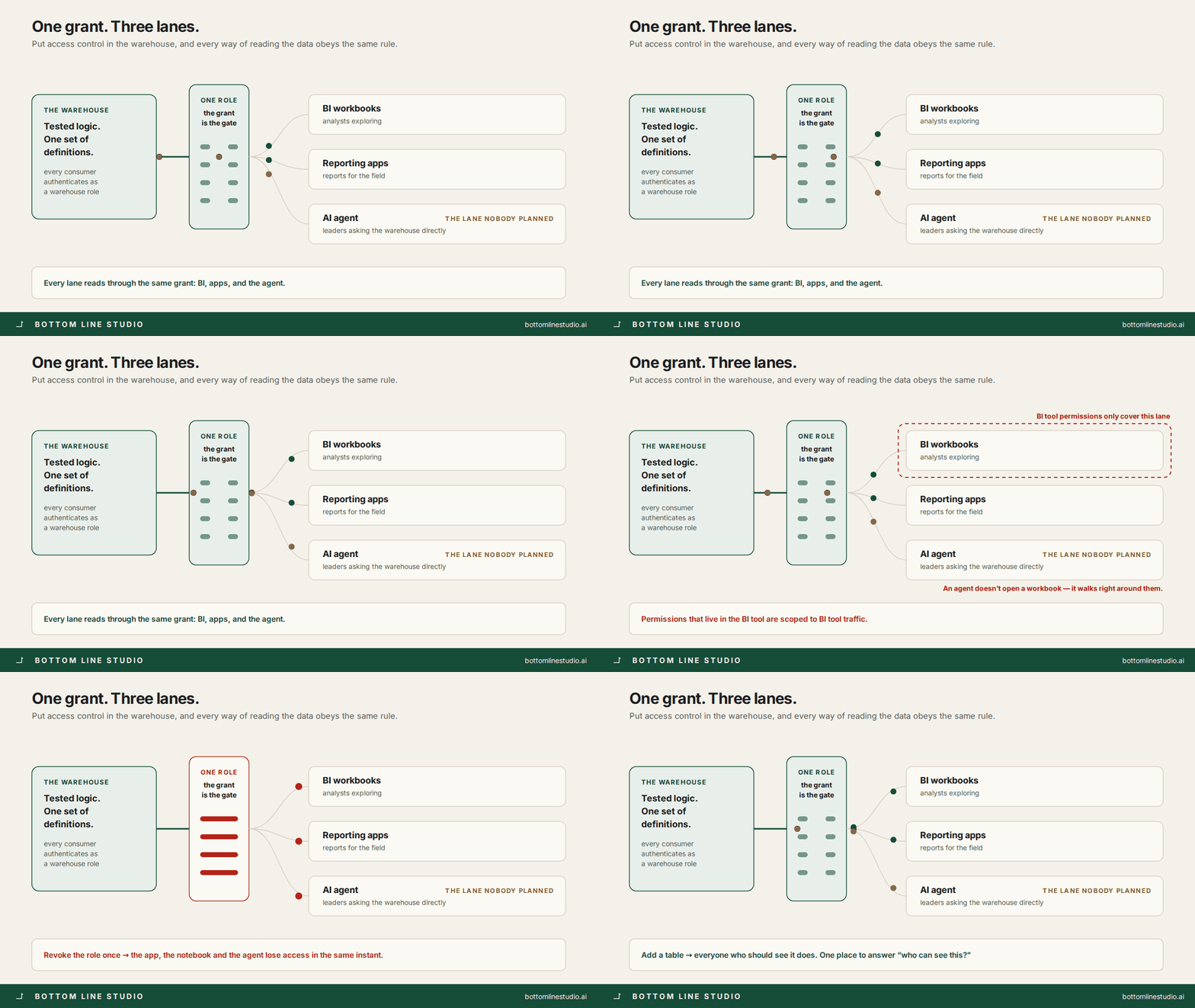
Here’s how each round played out — including the two the BI tool won, and the one that settled it.
The decision is where the logic lives
A BI tool pulls the logic into itself. You point a workbook at a table, and then the aggregation, the calculated fields, the filter defaults and the formatting all live inside the tool. That’s the product working as designed, and it’s good at it.
Your own reporting app flips that. The presentation lives in git, as code. The logic has nowhere to hide, so it stays in the warehouse, where it can be tested. Everything else follows from that one difference: how changes get reviewed, who can make them, and where access is enforced.
Round 1: more than two people editing → code wins, and it isn’t close
A workbook is a hard thing to build as a team:
- Two people editing the same workbook don’t get a merge conflict. They get last-write-wins.
- There’s no diff a reviewer can read, and promoting a dev copy to the real one is a careful manual ritual.
- The logic that matters most — how a stage is counted, which accounts are in scope — sits in a calculated field no test covers and no reviewer sees.
I wrote a 200-line build spec for one sales leaderboard workbook: dataset config, filter defaults, calculations, section by section. That document existed because a workbook can’t document itself.
With code, every report is a folder in a repo. Push to the dev branch and it builds to a test URL. Merge to main and it’s in production. Code review is normal code review. It also meant an AI agent could write a new report and open the pull request — while being structurally unable to touch the infrastructure, because that line was written down and a human held the gate.
The catch: this only works if the people who need reports can write Python and SQL, or have someone who will. On this engagement they largely could. At most companies they can’t, and that changes the answer.
Round 2: ad hoc reporting → a clean split
This is where I have to be fair to the BI tools, because “ad hoc” is two different jobs:
- Exploring → BI tool. An analyst asking “by region, now by segment, now without renewals” should never wait on a deploy. Pivot, drill and cross-filter come free. Rebuilding that yourself is weeks of work to get something worse.
- A deliverable → a script and a generated file. “Leadership needs a readout on this cohort by Thursday, and nobody will open it again after Thursday.” A SQL file and a script produce a finished page in an afternoon. No license, no workbook to maintain, no confusion later about whether it’s still live. Disposable is a feature.
- Multi-step logic → code with tests. Reconciling meetings against CRM records, resolving account ownership, attribution rules with real branching. You can force that into calculated fields. You shouldn’t.
Running both isn’t a compromise here. It’s the right answer.
Round 3: access control and agents → the warehouse
This is the round that decided it, and the one people underweight.
Every consumer of the warehouse — an app, a scheduled job, a person in a notebook, an AI agent — signs in as a warehouse role. We built one least-privilege role for agent access: read access to specific schemas, including tables that don’t exist yet, and nothing else. The agent connection was one more grant on that same role, with credentials issued per person so revoking one doesn’t take down anything else.
The result: the grant is the gate.
- Add a table, and everyone who should see it does.
- Revoke the role, and the app, the notebook and the agent all lose access in the same instant.
- “Who can see this?” has exactly one place to check.
A BI tool layers its own permission model on top: workbook permissions, dataset permissions, folder inheritance, row-level security. All real, all useful — and all a second system that has to agree with the first. When the two drift, nobody gets an error. Someone just sees a row they shouldn’t, or doesn’t see one they should.
To be fair: that second model buys you usage analytics, certified-dataset badges, scheduled delivery, and an audit trail your compliance team already recognizes. In a regulated shop, that’s worth real money.
But the moment agents show up, a permission model inside the BI tool stops covering the traffic. The agent doesn’t open a workbook. It queries the warehouse. If your access control lives in the BI layer, the agent walks around it. If it lives in warehouse roles, the agent follows the same grants as everyone else, on day one, with no new work.
And the part I didn’t plan for: once the grants were clean, leaders stopped asking for dashboards and started asking the warehouse directly. We built two delivery lanes and got a third one for free.
What your own container actually costs
I’d be selling you something if I stopped there.
- Someone owns the infrastructure. A tunnel, proxy routes, environment settings in two environments. When it breaks, it breaks in ways a BI admin never sees. Two real ones from this engagement: a production setting pointed at a schema that didn’t exist, so apps quietly read from the wrong place; and a build that didn’t fill in a variable, so it sent the variable’s literal name as the password — an error that looked like a credentials problem and wasn’t.
- You give up self-serve. Every filter, sort and export button in a custom app is something a person wrote. If your need is “the same six charts, sliced many ways, by people who don’t write code,” buy the BI tool. That’s the product.
- The cost curves cross, in opposite directions. Per-seat pricing punishes wide audiences. Per-container pricing punishes lots of small always-on apps. We folded several separate services into one process, which cut both the bill and the number of things that could break.
The rule we ended up with
Put the logic in the warehouse. Then choose the delivery layer by who edits it:
- Business users exploring and changing their minds → BI tool.
- Logic that needs review, tests and a promotion path → git-backed app.
- One-off deliverables with a shelf life → a generated file, shipped and forgotten.
- Anything an agent will read → governed by warehouse roles, whatever the front end.
Neither tool is the answer. The warehouse is the answer, and both of these are ways of looking at it. The expensive mistake I see most isn’t picking the wrong one. It’s picking one and letting the business logic move into it — until the definition of a qualified opportunity lives in a formula nobody can review. You can make that mistake on either platform.